Every hour of YouTube content you have published is packed with your opinions, your frameworks, your specific recommendations, and your hard-won expertise. Right now, that knowledge sits locked inside video files — accessible only to viewers willing to watch from start to finish. Training an AI chatbot on your transcripts unlocks that knowledge and makes it instantly searchable, 24 hours a day.
Until recently, this required a software engineer, a vector database, an embedding pipeline, and weeks of setup. Today, no-code platforms have collapsed that entire workflow into a single URL paste. Here is exactly how it works — and how to do it yourself in minutes.
TL;DR
- Unlock Video Knowledge: Your old videos contain valuable answers; an AI makes them instantly searchable for fans.
- Why Transcripts Work Best: YouTube captions naturally capture your tone, vocabulary, and specific recommendations better than blog posts.
- No Coding Required: Just paste your YouTube channel URL and the platform handles chunking, vectorization, and retrieval automatically.
- Auto-Updating: The AI re-indexes automatically whenever you upload a new video.
Why Transcripts Are the Right Data Source
YouTube automatically generates closed captions for most videos. These captions are a near-complete textual record of everything you have said on camera. For an AI knowledge base, they are the ideal raw material because they capture your vocabulary, your phrasing patterns, your opinions, and your factual claims — all grounded in the content your audience has already watched and trusted.
Contrast this with training on a blog or an FAQ page. A blog post captures a fraction of what a creator communicates. A 20-minute video transcript, by contrast, contains the nuance, the examples, the analogies, and the conversational tone that makes your audience feel like they know you. That depth is what makes a transcript-trained chatbot feel authentically like you — not a generic AI.
How RAG Actually Works With Your Transcripts
When you connect your channel, the platform runs your transcripts through three stages:
Chunking
Each transcript is split into overlapping segments of a few hundred words. This ensures that context is preserved at the boundaries between chunks.
Vectorization (Embedding)
Each chunk is converted into a numerical vector that captures its semantic meaning. This allows the system to find relevant passages based on meaning, not just keyword matching.
Retrieval + Generation
When a fan asks a question, the system finds the most relevant chunks from your transcripts and passes them to the language model, which writes a response based solely on that retrieved content.
The practical result: the bot can answer "What did you say about budget microphones in your home studio setup video?" with the exact answer from that specific video — even though it was published two years ago — without you ever having to find or reference it manually. You can read more about how RAG compares to fine-tuning for content creators in our detailed technical breakdown.
Step-by-Step: Train Your AI on Your YouTube Channel
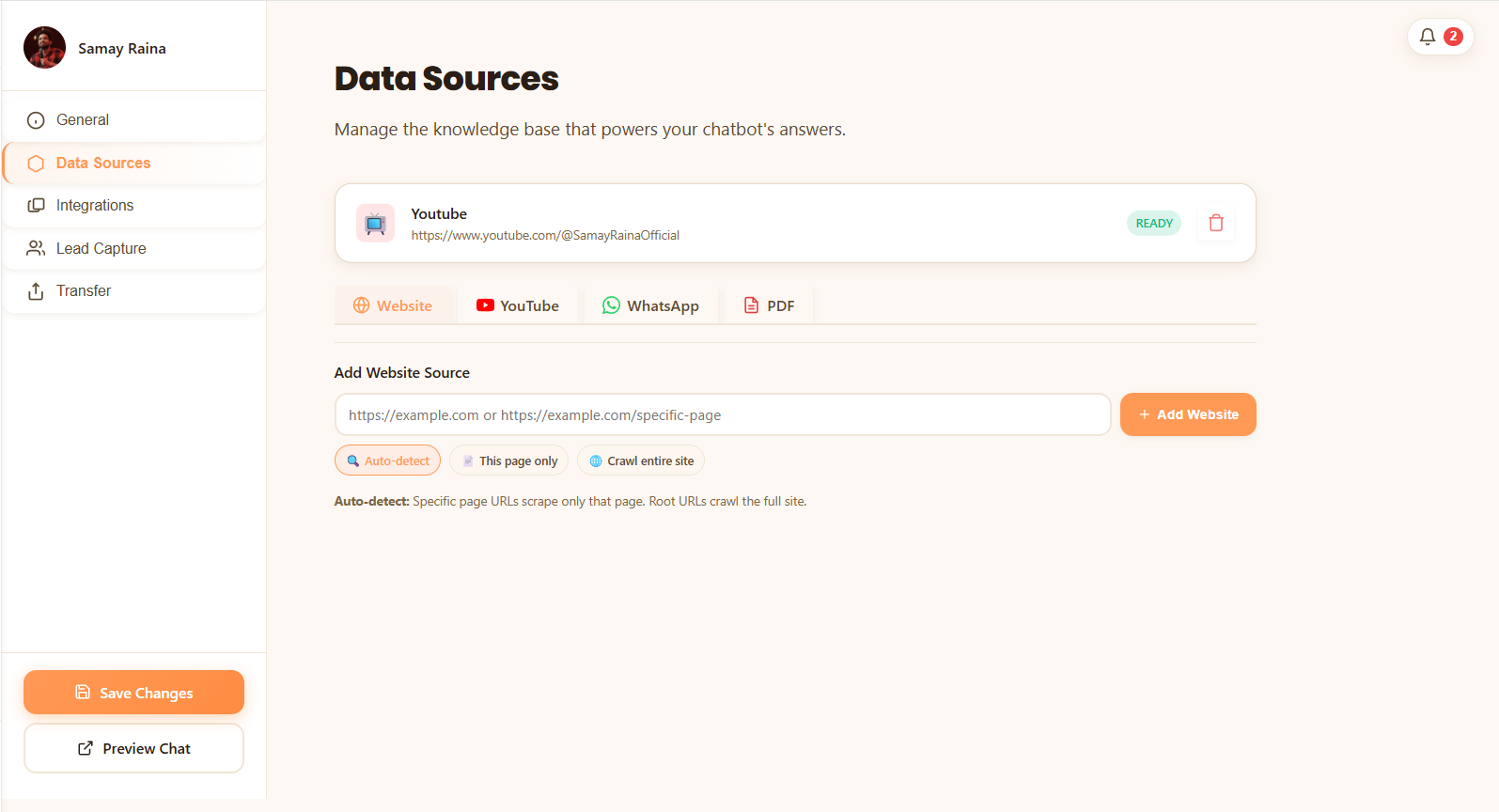
Step 1 — Connect Your Channel
In the YoppyChat dashboard, navigate to Data Sources and click the YouTube tab. Paste your full channel URL (e.g., https://youtube.com/@YourChannel). The system will begin fetching your video list and extracting transcripts automatically. For large channels with hundreds of videos, this may take 10–20 minutes.
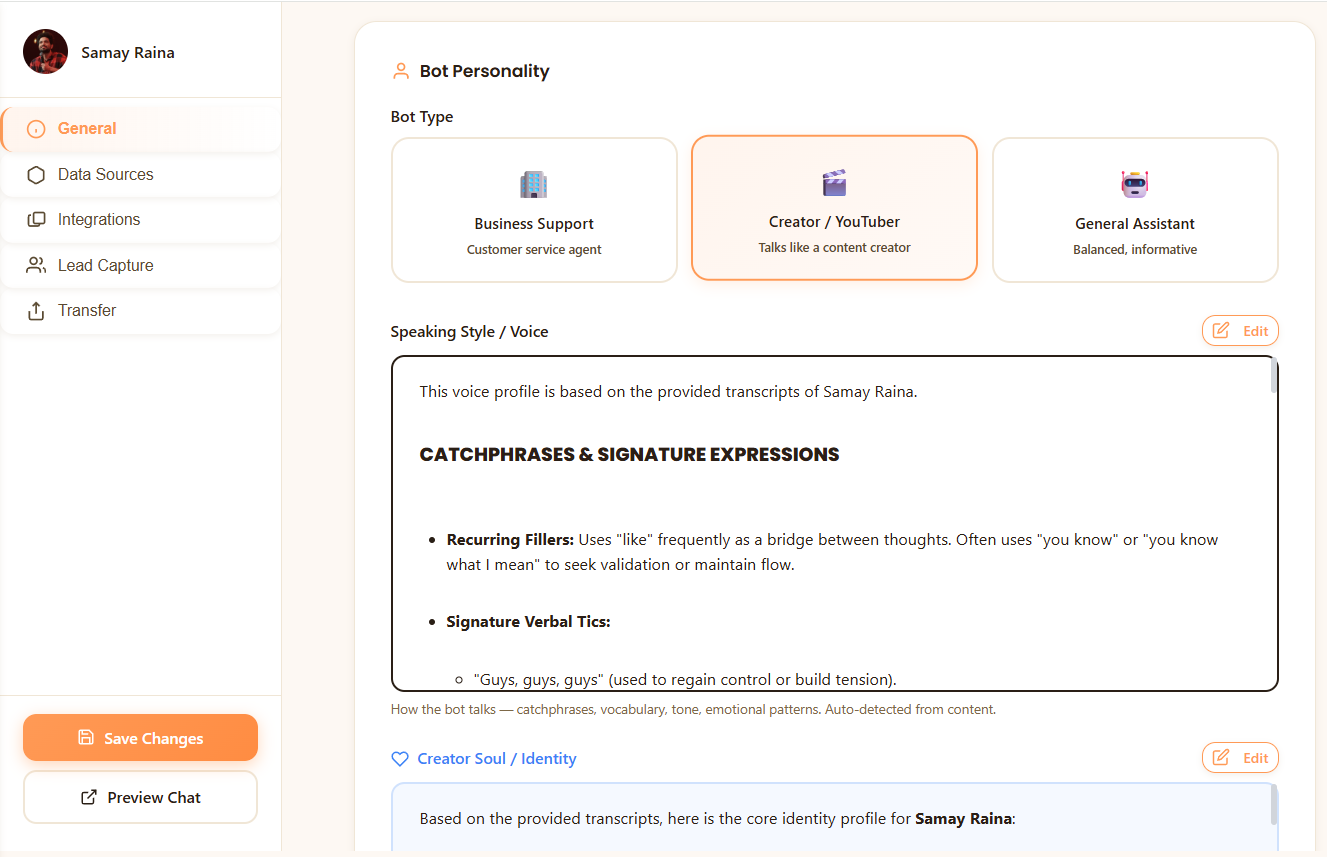
Step 2 — Configure Your AI's Persona
Navigate to General settings and define your AI twin's name, tone, and guardrails. Critically, set an instruction that prevents hallucination: "If you do not know the answer from the provided video content, say so clearly rather than guessing."
Step 3 — Test Before Deploying
Use the Preview Chat button to ask your own bot 10 questions — mix easy ones ("What camera do you use?") with complex ones referencing old videos. Review the answers for accuracy and tone. If a topic is weak, add a supplementary PDF or document to the knowledge base to fill the gap.
Step 4 — Deploy Across Your Community
Once satisfied with quality, deploy from the Integrations tab. One trained knowledge base can power your Discord and Telegram bots, your website widget, and your YouTube comment auto-replies — all simultaneously, all from the same training run.
What Happens When You Post a New Video?
YoppyChat re-indexes your channel automatically when new content is published. Your AI twin always reflects your latest videos without any manual intervention. This is fundamentally different from fine-tuning, which would require you to retrain the model every time your content changes — a process that can take days and cost hundreds of dollars per run.
Frequently Asked Questions
How do you train an AI chatbot on YouTube video transcripts?
With a RAG-based platform like YoppyChat, paste your YouTube channel URL into the Data Sources dashboard. The system automatically extracts closed captions, chunks and vectorizes the text, and builds a searchable knowledge base. No manual transcript downloads or coding required.
Do I need to download my YouTube transcripts manually?
No. YoppyChat automatically fetches and processes your YouTube closed captions directly from the channel URL. The entire ingestion pipeline runs in the background and takes minutes, not hours.
What happens if I publish a new YouTube video after the AI is trained?
YoppyChat re-indexes your channel automatically when new content is published, so your AI twin always reflects your latest videos without any manual intervention.
Nikhil Rathour
Founder, YoppyChat
Nikhil is the founder of YoppyChat, a no-code platform that lets creators and businesses deploy AI chatbots trained on their own content. He writes about the creator economy, AI automation, and practical strategies for scaling digital communities.
Turn your video library into a 24/7 AI knowledge base.
Paste your YouTube channel URL and YoppyChat handles everything — transcript extraction, vectorization, and fan-facing deployment. No code, no engineering team.
Start Training Your AI Free